The platform is experiencing some issues - we are very sorry about it. Our engineers are already working on stabilizing the system. If you would like to get live updates on the status please subscribe on our status page here.
Benefits of eInvoicing with Tradeshift

Easy Setup - No installation of hardware or software required.
Real-time Monitoring & Communication
Public Profiles & Network - Promote your business, products and services
Start invoicing with Tradeshift
We built a short guide on how to get started quickly with only 5 steps.

These five steps will guide you through the most important steps invited supplier should take while and after responding to the invitation email of their customer.
Invoicing Envision
Envision Process
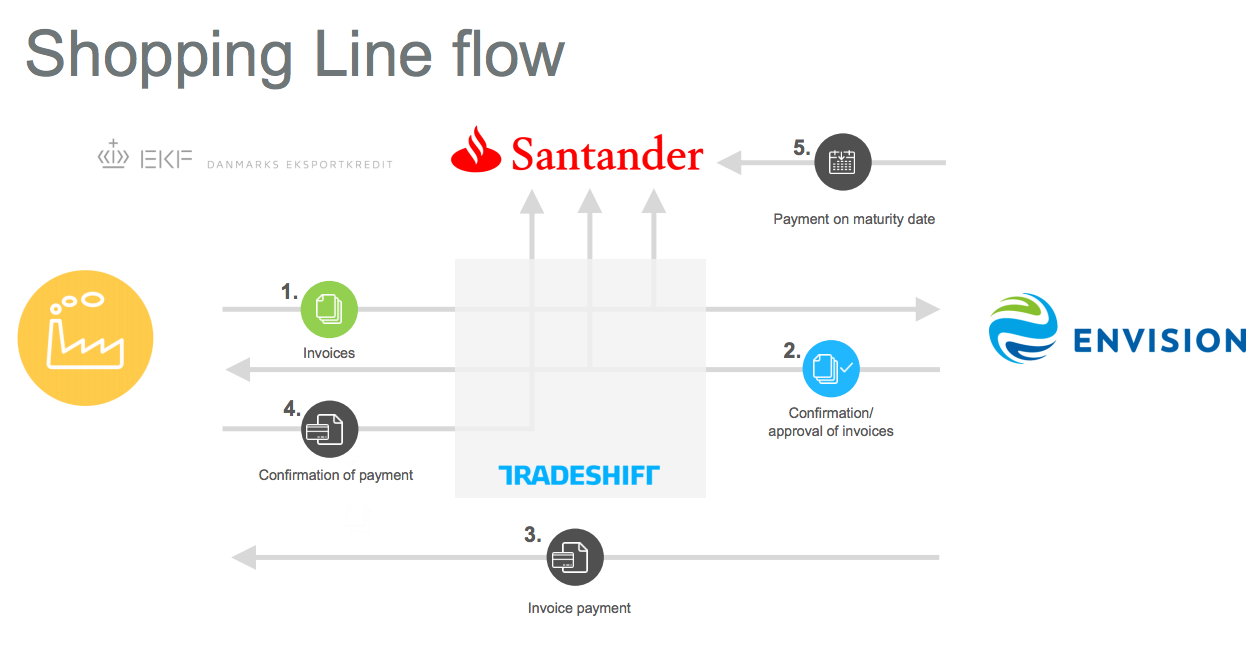
After suppliers have been onboarded to Tradeshift, created their account and connected to the relevant Envision Entities the process proceeds as described in the steps below:
- Supplier manually creates the invoice in Tradeshift, attaches a copy of the original invoice or other supporting documents and sends it to Envision
- Envision confirms the matching of the Invoice and document status is updated on both the supplier and Envision account.
- Envision initiates the payment via their existing payments operations
- The supplier confirms in Tradeshift that the payment has been received
Business Firewall
Validation rules ensure that the vendor provides information in all the required fields. Envision can then process the invoice quickly and efficiently without any unnecessary queries or delay. Validation rules are a way of enforcing compliance which benefits both the vendor and Envision.
During invoice submission, each document will be validated against rules. If the requirement set by the rules are not met, invoice fails and the supplier is notified with the reason for invoice submission failure. The invoice can be corrected and re-submitted.
When Invoicing Envision the additional mandatory field for suppliers to fill out is:
- A valid purchase order number
- An Envision Person of Reference
- Payment Due Date
- Attachments are required